
Account Statement Template
Download an Account Statement for Invoice and Payment TrackingSpreadsheet123's Account Statement provides an excellent way for invoice and payment tracking, customer account management, and helps to create an overview of transactions. Although this template may not offer all features and amenities of the sophisticated billing software, it takes less effort, which means that you can start creating statements in a matter of minutes. It has columns for recording the date, invoice number, description, a column for recording charges, fees, etc., and a credits column for recording payments received from your customer. Additionally, you can use this template as an accounts receivable ledger for a specific customer as it lets you record individual transactions and calculates the current account balance.
This type of account statement is useful for summarizing the activity on the customer account, especially where regular payments are being made. It provides a convenient way of showing recent transactions, fees charged and debts owed and helps to provide your customers with simple and straight-forward billing experience.
You can download and personalize it for your business efficiently. In addition, the account statement shares a similar design and offers the same experience as most of Spreadsheet123's invoice templates, which are also free to download.
Account Statement
for Excel, Google Sheets & OpenOffice.org Calc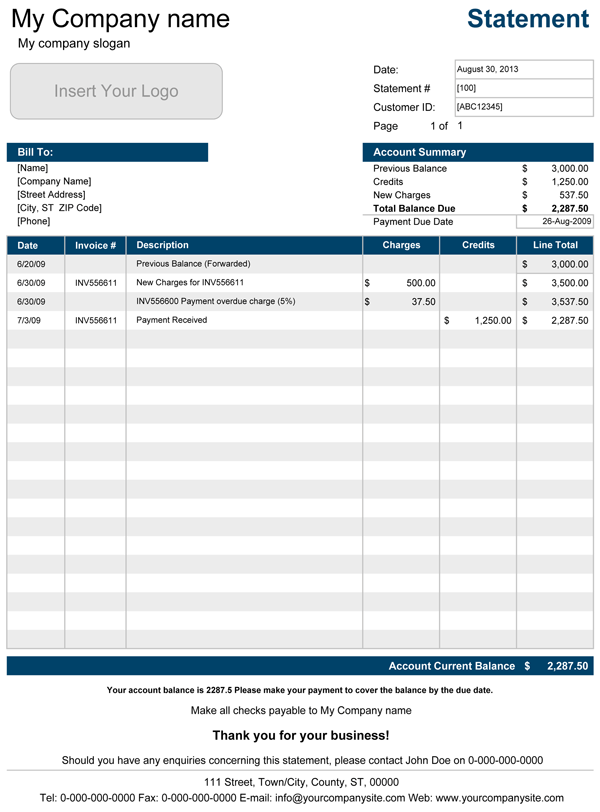
Categories
Invoices BusinessLicense
Specifications
Description
The account statement (a.k.a. billing statement) template is a simplified alternative to a small business billing software, which allows keeping track of customer account balance, track invoices, prepare and mail account statements to a customer to indicate the account arrears.
How to use the Account Statement
Once you download this template, head over to the Settings tab where you can set up the essential details of your company, such as the company name, slogan, company address, phone number, etc. Also, select the currency symbol appropriate for your country of residence from the drop-down list in the country-specific section. If the currency symbol that you are looking to add isn't available, you can learn how to add currency symbols to this and other invoice templates on our support page. You can personalize the look of the account statement farther, by choosing the color theme from the menu.
There several essential and non-essential parts that you may want to consider before diving into preparing billing statements for your customers. This billing statement template is not fully automated billing software. Instead, this is a simple application that doesn't require advanced knowledge of Excel.
Depending on how you are planning to use this statement, you may or may not want to use the statement number or a page number. If you do not have any immediate plans on using the statement #, you can remove it or cut and paste the customer ID on top of it. You can get rid of the page number, by simply deleting it. All in all, before you start modifying anything I recommend keeping at least one personalized copy, in case if you need to revert to the original without having to set it up again.
The first row in the transactions area of the statement is intended for entering the Forwarded Account Balance from previous statements. It does not contain the formula responsible for calculating the Line Total. You can enter the negative value when your customer account is in arrears. The Current Account Balance is calculated as the Sum of the Forwarded Balance PLUS, the Sum of all Charges MINUS the Sum of all Credits.
There is no right or wrong method for recording transactions, but the recommended approach is to record transactions organized by date, it makes it easier to read and follow. The Charges column is for recording charges, invoices, and fees billed to your customer while the Credits column is for payments received from your customer. Negative values can also be entered if you need to record refunds, discounts, etc.
If you need more rows for entering transactions, you can add additional rows above the last row in the transactions area, so that the formula in the Current Account Balance updates correctly.
The Account Summary section conveniently displays an overview of the customer account, including previous balance, new charges, credits, and the total balance due.
Sending the Statement to a Customer
The safest way to send the account statement to your customer is to print to a PDF file and email the file, instead of sending the Excel spreadsheet. This will save you some printer ink and paper. You can use a PDF converter or printer to create a PDF file for Microsoft Excel 2010 and earlier or use a built-in PDF converter in Excel 2013.
If you choose to send statements via mail, you may want to consider sending two copies, so that your customer can keep one for their records and return the other with their check. You may also want to consider including an envelope with a pre-printed return address.