
Invoice Register
A handy way to keep up with invoices and payments using Invoice Register.Creating an invoice is not rocket science, especially when you have access to so many templates available to download, such as the sales invoice, the service invoice, or even simple ones like a basic invoice. The possibilities for this regard are endless. On the other hand, keeping up with all the invoices that you create on a day-to-day basis is not necessarily an easy task. This is when our Invoice Register can come in handy.
The Invoice Register Template helps to keep track of the invoices raised, payments received, and overdue balances.
Invoice Register
for Excel, Google Sheets & OpenOffice.org Calc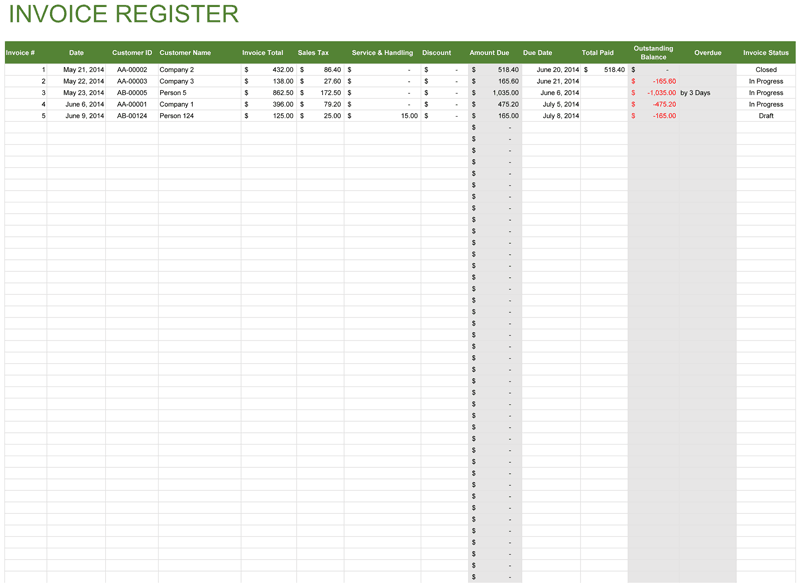
Categories
Invoices BusinessLicense
Specifications
Description
You do not need to change the existing methods of invoicing your customers or use some specific invoice template to begin using the invoice register. You can use this template with pretty much any system that you currently have in place.
You can begin using this template in no time at all. Start by copying the information from your existing invoices into the table. You can return to the spreadsheet every time when you have to enter new information in or when it is necessary to update existing invoice data to keep all of the invoice and payment data up to date.
The template can accommodate plenty of entries, but all of the entries have to be done manually, which sometimes can be very inconvenient especially if you send many invoices daily. If you need more automation with your invoicing and bookkeeping, you can try our Invoice Manager Pro, free for 30 days, which can help you to do all this and even more.