
Computer Repair Invoice
Invoice your clients with ease, using this professional computer invoice templateTypically the entrepreneurs or business owners are the long term customers who expect professional work and bring a steady flow of money for other businesses as well. If you have recently started your business and need a simple invoicing solution that both looks professional to your business customers and easy to use, then Spreadsheet123's Computer Repair Invoice is an excellent choice for you. It lets you create professional invoices for your business and residential clients. This template enables you to record charges for parts and services provided to your customers, which may be all you need to have for your business.
In this template, we have provided two types of invoice templates, first that allows you to capture the lump-sum amount of your services and the second that will enable you to capture the number of hours and the hourly rates that you charge for your labor. This is especially useful when you have different technicians working on different tasks at different hourly rates or when various services that you provide are charged at different hourly rates. You can record the parts that were replaced or installed to provide your customers with detailed information about the repair. This template is excellent for startups as well as medium-sized businesses and is a perfect substitute for expensive invoicing software. Whether you run your shop single-handedly or you have a team, you can use this template to create professional invoices quickly.
Computer Repair Invoice
for Excel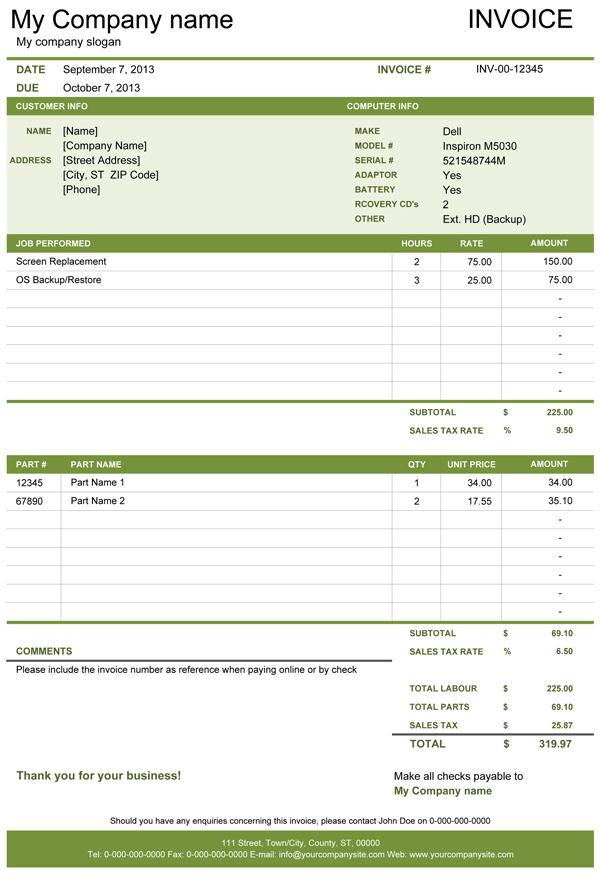
Categories
Invoices BusinessLicense
Specifications
How to use the Computer Repair Invoice
Download and set up the template by entering your company details like Company Name, Company Slogan, Company Address. You can also select the relevant currency symbol from the drop-down menu under the country-specific settings. Here you can set the suitable tax type and their percentages, both on parts and labor. This invoice template also has an inbuilt design picker, where you can choose a color that is most suited to your brand. And if this is not enough, you can also use Excel's native Themes or colors, which you would find in the Page Layout ribbon.
After the setup, you can choose which invoice you want to use for the specific customer from two available invoices. Both invoices are mostly the same except that Invoice B will let you record the hourly labor with a specified hourly rate, while Invoice A will let you enter the total cost of labor. Enter the customer information and information about the product that you are repairing in the sections provided. After this, you can create a list of jobs performed under the "Jobs Performed" section along with the amount you want to charge then record the details of the parts replaced or installed along with quantity and unit price. In case if you are providing some discounts to your customer, then you can also add discounts in the last row under each section and enter the amount as a negative value. The subtotal and total amounts are calculated automatically.
You can use the "Comments" section to write any payment terms such as how many days your customers have to pay you and where or how they can pay etc.
Recent Questions
What is the Total Labour and Total Parts? Total Labour is the sum of the charges of all the jobs listed under the Jobs Performed section and Total Parts is the sum of the amount of all the parts replaced or installed during a repair.
Why there is more for labor and parts? Some countries/states have different methods for taxation of labor and physical goods, which means that sometimes labor can be taxed differently than parts. So to compensate, we have allowed separate tax inputs for separate sections, but if the tax is the same for everything in your country or state then you can simply enter the same tax rate in both fields, this will not double up your tax calculations on the invoice.
What is the Invoice Total? Invoice Total is the sum of Total Labour, Total Parts and the sum of Sales tax which is calculated as per the Sales Tax Rates specified for labor and parts separately.
Just remember not to delete formulas that column Line Total contains as well as a formula from sub-column Sub Total, Sales Tax, Total Part and Total Labour that contain currency symbols. Once you become more familiar with the template you can simply protect these columns from unnecessary changes using Excel's Protect Sheet option.
We recommend you to send a PDF version of your invoice instead of the Excel file. You can use PDF converter or printer to create a PDF file for Microsoft Excel 2010 and earlier or use a built-in PDF converter of Excel 2013. Alternatively, you can also print it and send it by mail service or FAX.
Function used in template
- SUM(number1, [number2], [number3], [number4], ...)