
Service Invoice Template
Free Professional Invoice Templates for Microsoft Excel®While sophisticated billing software may be of benefit to large organizations, manufacturers and distributors, service-oriented smaller organizations and sole proprietors often seek more user-friendly and less expensive alternatives. We tailored the service invoice template in order to provide a free, uncomplicated and effective tool to smaller businesses. Right out of the box, Spreadsheet123’s service invoice templates published on this page are ready to use tools which require little to no customization
Below you will find several invoice templates, each designed to meet the expectations of a particular type of businesses, such as consulting agencies, law offices, freelancing agencies, accounting firms and other service-oriented establishments.
On the other hand, you might want to download our sales invoice template for the companies that are less service-oriented and for the companies that are predominantly focused on providing physical goods.
Service Invoice Template
for Excel, Google Sheets & OpenOffice.org Calc
Categories
Invoices BusinessLicense
Specifications
Description
Prior to describing how this template works, we would like to indicate that the general design of this template is consistent with other invoice templates offered on Spreadsheet123.com. Once you learn how to use one template, the use of the rest of the templates becomes effortless.
What about this template then?
First, once you download this invoice, please see its settings tab. This is where you can change most of the essentials of the template. For example, you can show or hide your company name or slogan, enter your company details or select the currency symbol relevant to your country. You can even change the color scheme of your invoice template. Some of the settings are optional and some are not, but the important part is that all four invoice templates within the spreadsheet will reflect the changes you make on the settings tab.
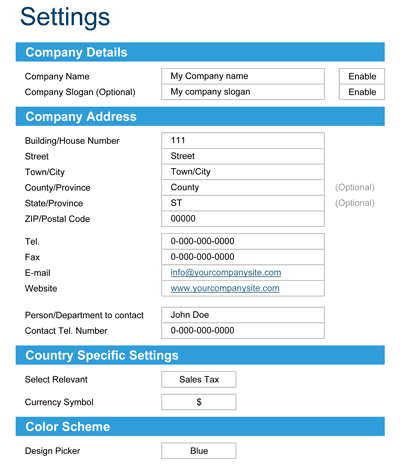
Furthermore, you can also insert your logo. Just remember to delete the place-holder image, which we have included in the template.
Printing and Sending your Invoices.
The best way to deal with this task is to convert your invoices to PDF, which you could send via email to your clients, rather than mailing paper copies. If you are using the latest version of Microsoft® Excel®, which has a built-in PDF converter, you do not need any additional software. However, in order to create PDFs in earlier versions of Microsoft® Excel, you will need to have software, such as Adobe Acrobat® or something similar.
Service Invoice with Hourly Rate
for Excel & OpenOffice.org Calc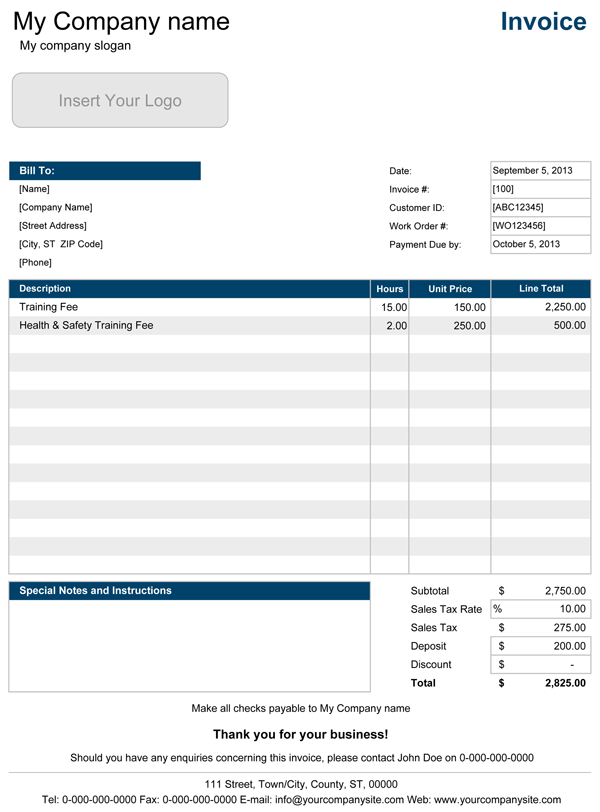
Categories
Invoices BusinessLicense
Specifications
Hourly Rate Invoice
Modification of the original service invoice template, which contains fields for entering hours and hourly rate. This version is excellent for an organization that provides the so-called charge per hour service, i.e., plumbing services, electrical services, legal services. This particular version is also suitable for use as a timesheet invoice to invoice anyone who is using the service you provide on a more permanent basis.
Service Invoice with Hourly Rate and Optional Tax
for Excel & OpenOffice.org Calc
Categories
Invoices BusinessLicense
Specifications
Hourly Rate Invoice with Optional Tax
This version is very much identical to the one above, except that it also contains an additional column, where you can specify all items which are the subject for the sales tax. In the Totals section you see the summary of all Taxable services, the applicable tax rate and the sales tax.
Service Invoice with Customer List
for Excel & OpenOffice.org Calc
Categories
Invoices BusinessLicense
Specifications
The invoice with Customer List
Another modification of the original service invoice template, which also contains a list of customers, lets you create and maintain the list of your customers, and then call each customer details by only entering their ID into the Customer ID field of the invoice. The "Bill to" areas of the invoice will get updated automatically when the customer ID is entered, so you would no longer need to reregister the details there manually. This version is excellent when working with frequent clients. It helps to keep all the information in one place.